Blog

Ruch 9:03 Video Meeting!!

Hi all.  This post is to provide some instructions and best-practices for participating in the new COVID19-era version of the famous and historical “Ruch 9:03.”  If you don’t know what this means, no worries.  If, however, the 9:03 has been an important part of your life, then read on…
ZoomScreenAlbertNMe.jpg

The meeting will take place at 9:03 every Saturday, but via Zoom video conferencing (until further notice).

Zoom is free and runs on your phone, tablet, or computer.  You don’t even need to make an account or provide any of your information to join the meeting.  Download the Zoom software here. If you have the meeting ID URL already, then just click on that, and you’ll (likely) be prompted to install the software automatically.

I’m not going to publish the meeting ID# here, but you can get it from someone who regularly attends the 9:03. Once you’ve installed the software and have the link, please join us at the meeting time!

If you’re the type who likes to read instructions :-)), there are a number of guides for using Zoom on Mac or Windows or on iPhone or Android.

For all joining the meeting, I’ll briefly list a couple of tips and best practices for using zoom conferences, and for participating in large video meetings in general.

  • Right before you enter the video meeting, there is a little dialog asking you to give yourself a username. PLEASE Enter Something here, ideally your first name and last initial. Otherwise we’ll end up with dozens of people named “iPhone” or “Username.”  It looks like this on an iPhone:

ZoomHandle.png

  • Next you might (especially on mobile) be asked if you want to use internet audio or connect via a “Dial In” phone call.  If you’re connected to internet ( WiFi network), then select InternetAudio.  That looks like this on iPhone:

ZoomAudioOption.png

  • If you opt for “Dial In” then it will use your cell phone to make a call into the meeting.  Although I’ve used it, I’m not as familiar with this, so you’ll have to figure it out.  The Zoom app might ask you to allow it to have access to your microphone.  If you want to talk or share, then you must allow this access.
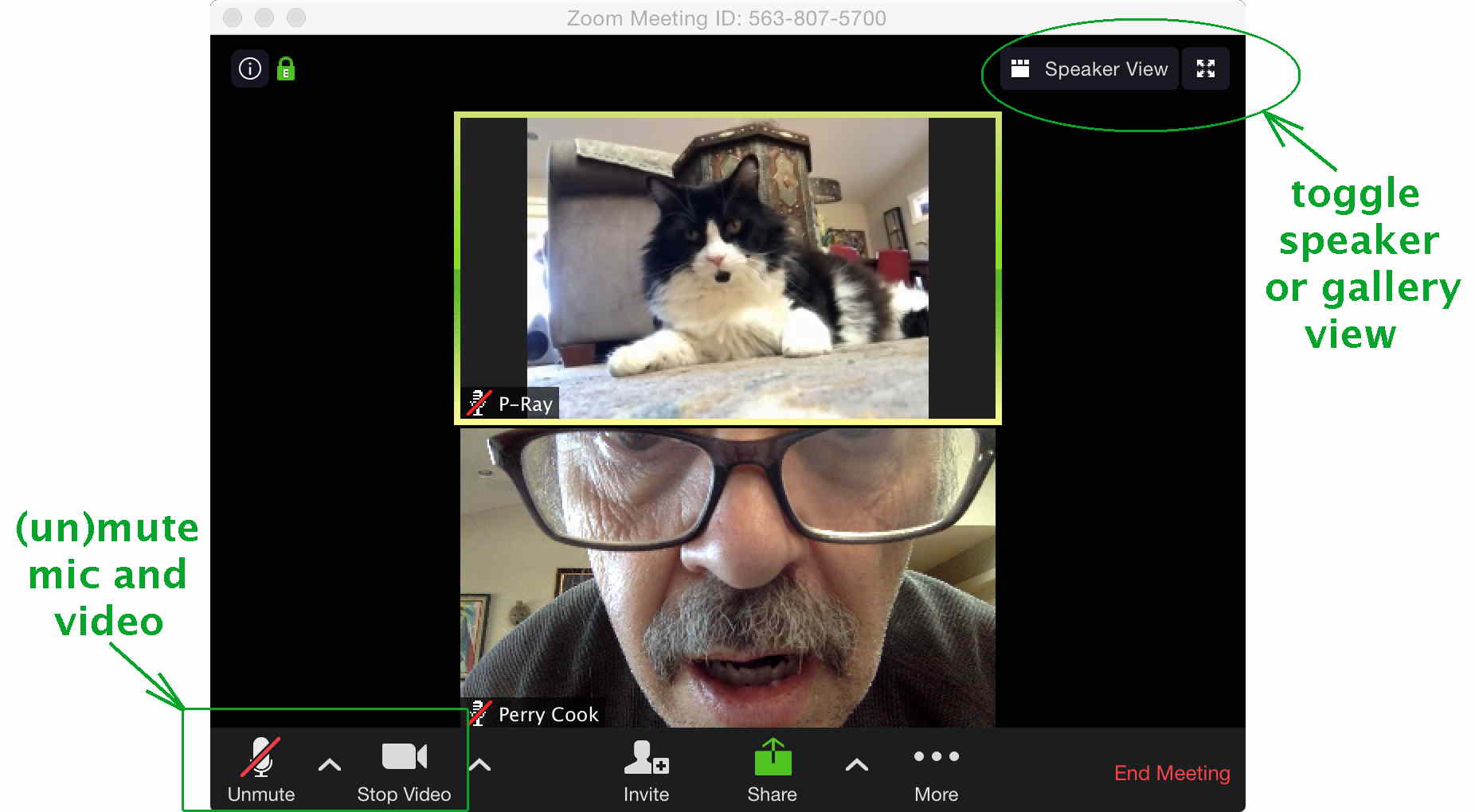
  • Once you’re in the meeting, there are some critical controls that you should use.  One selects whether you share video or not.  It’s pretty fun to see everyone, that’s up to you. 
      • NOTE:  If you’re on Mobile, or have data caps on your Internet Service plan, please be aware that videoconferencing uses bandwidth and data.  Video is especially thirsty.  It is Strongly Advised that you use WiFi rather than your Cell data, and if you have data caps, you not share Video.
  • Another control mutes and unmutes your microphone.  PLEASE MUTE YOUR MIC unless you’re talking.  Video meetings can quickly turn into disasters when people are cooking, making smoothies, flushing toilets, yelling at children, etc. with their audio unmuted.  The video and Audio/Mic mute controls are located in the lower left of your screen (you might need to mouse roll over them or click near there to make them show up).
  • Also, if at all possible, WEAR HEADPHONES (or earbuds/earpiece for mobile).  If you want to share, you’ll have to unmute your mic, and that can cause horrible feedback.
  • If you are on a computer, you can momentarily unmute your mic by simply holding down the space bar.  This is good for quickly saying “Hi P-Ray” or “Thanks P-Ray” or other, and releasing the space bar automatically re-mutes your mic.
  • One control in the upper right lets you display the conference “Full Screen.”  Another control in the upper right allows you to select “Speaker View” (the person speaking shows up large, with all others showing up as a set of smaller tiles (one important reason that everyone should mute their mic if they’re not talking), or “Gallery View” (everyone shows up in equal-size tiles).

MeNAlbertNotated.jpg

  • Other functions along the bottom include Chat, which we can use to help others get their tech sorted out.  The temptation to, uh, well chat, in that channel is quite high, but let’s leave Chat relatively quiet during the meeting, OK?
  • If the audio/video breaks up during your session, or your computer tells you “your internet connection is unstable,” try turning off the feed of your video (Stop Video in lower left of screen), and of course muting your mic.
  • There are other items and issues that I’m likely forgetting here, I might add to this list as time goes on, but this should get you started.  Please ask others who seem to have figured it out to help you out if you’re having trouble.  We’re  all here to help each other.

I hope this new meeting format allows us to get together, check in, and basically do what we know is good for us to do.  We’re all “Trudging this Road” together, no matter how strange the path may get.  And we can do it so much better when we stay connected.

Love you all,

P-Ray

(PS:  Thoughts and Love go out to Peter and his family)


ARs Now Available Everywhere

Thanks so much to all of you who have purchased/listened, and sent messages about my new album ARs. If you haven’t checked it out yet, I can happily announce that it’s now correctly listed on iTunes, and in all major digital/physical portals. If you’re old-school and like a real CD (with 12 page booklet), you can get that via BandCamp or CDBaby. Thanks for your support!

Buy CD/Digital (with 12 page CD booklet) on BandCamp or CDBaby:

or
Buy digital downloads at:

ARs (2017), an album of music

ARsAlbumFrontBack

ARs = Addiction, Recovery, Sobriety (acceptance, redemption, serenity, sanity)

This album represents ten years of work. Not just work on the songs, but also ten years of living sober. An amazing decade of pain, joy, fears, hopes, loss, growth, learning, and change. Ten years of life, fully present to feel, breathe, love, and be grateful. I hope these songs will help or inspire others in some small way. This record was created and offered as thanks to those who helped me. You know who you are.

The songs, nine originals and seven covers, speak of human struggles, and the rewards of living. They’re arranged in a narrative, as Acts I & II. I urge you to read the notes and lyrics (no cover lyrics, but you can find those online). There is much tucked into the songs and writings. Examples: Ars is the Latin word for art, Au is the chemical symbol for gold, and traditional practices held triple meter to be sacred, yet 4/4 was considered “common.” Listen, read, think, and most of all, feel.

This record is my offering to you.  Please enjoy.   And please tell your friends.  Over the next days I’ll post essays for the individual tracks.  Stay tuned…

Please share this music, but don’t steal it. Play it for your friends, buy it for them, or urge them to buy it. The CD/downloads are priced fairly. Please know that proper royalties were paid for the cover songs, plus CD production costs, etc. Thanks, P-Ray.

Buy/Listen at Bandcamp or CD Baby (iTunes, Amazon, others coming very soon…)

© 2017 P-Ray All rights reserved. Tracks 2,5,6,8,9,10,12, © the writers listed

 

Lamentation and Hope

Lamentation and Hope, by P-Ray, November 8-22, 2016

Some things seemed so obvious, others not too clear.
All our hopes and dreams seemed to suddenly dissapear.

‘Lotta sadness, ‘lotta fear.

we grieve

Confusion all around, like we lost our atmosphere.
‘Lotta folks sayin’ they’re gonna get outta here.

don’t leave

just breathe
_______________________________________________

The Scholar’s Prayer (unknown anonymous source)

“From cowardice, that shrinks from new truth,
From laziness, content with half-truths,
From arrogance, thinking it knows all truth,
Oh God of Truth, Deliver us.”
_______________________________________________

It’s hard to sleep, or cope, or even feel.
But we must live, and hope,
and love, and dream, and heal.

Stronger together, and without fear,

believe
______________________________________________________

Like P-Ray on Facebook
Watch the music video on YouTube
Listen/Buy song on Bandcamp